Skip to Content
XHelpWorks
 v1.0
Precision Standalone Tool for 
SolidWorks

XHelpWorks v1.0 interface: includes Smart Copy, Smart Calculator, DXF Generator, Quantity Counter, and Drawing Updater tools for automated CAD workflows and fabrication-ready outputs
XHelpWorks v 1.0

Precision Standalone Tool for       
XHelpWorks is your dedicated support system for SolidWorks—streamlining macros, automating workflows, and accelerating design-to-fabrication logic. Every module is crafted for the unique demands of SolidWorks professionals.
XHelpWorks v1.0 interface: includes Smart Copy, Smart Calculator, DXF Generator, Quantity Counter, and Drawing Updater tools for automated CAD workflows and fabrication-ready outputs

Discover XHelpWorks Feature

 Smart Copy 

One Click. Full Subassembly

Zero Hassle

Say goodbye to manual Pack & Go.

With Smart Copy, just select a subassembly in your SolidWorks tree and click once —XHelpWorks automatically duplicates, serializes, and reinserts the entire structure into your project, preserving all internal references.

Save up to 70% of your time when handling multiple configurations in the same project.
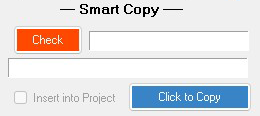
Smart Copy feature in XHelpWorks: one-click duplication and serialization of SolidWorks subassemblies with preserved references

Smart Calculator

Optimize Your Stock. Customize with Confidence

When a client requests a specific length, Smart Calculator instantly analyzes your available stock max and min sizes and calculates the optimal breakdown. It prioritizes ready-made units first, then customizes the remainder.

Result? You get a clear count of how many max, min, and custom pieces are needed without manual math or wasted material.
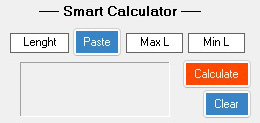
Smart Calculator feature in XHelpWorks: optimize stock usage by calculating max, min, and custom units based on client-specified length

 DXF Generator

Fabrication-Ready

in One Click
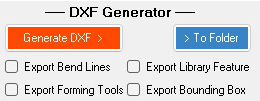
Export all your SolidWorks sheet metal documents to clean, fabrication-ready DXF files optimized for laser cutting and punching machines. With DXF Generator, you control the export style : bend lines, forming tools, library features, and bounding boxes , all selectable from within the app.
No manual prep. No missed details. Just precision DXFs, instantly.

DXF Generator feature in XHelpWorks: export SolidWorks sheet metal parts to fabrication-ready DXF files with customizable export styles

 Quantity Counter

Count Once , Trust Always
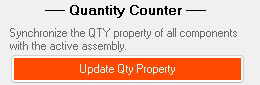
Stop wasting time manually counting components. With Quantity Counter, XHelpWorks scans your entire SolidWorks assembly parts and subassemblies and writes the correct quantity into each file’s custom property under “Quantity.”
This value flows directly into your drawing templates, eliminating human error and saving up to 70% of manual effort.
Result? Faster fabrication, fewer mistakes, and total confidence in your BOM.

Quantity Counter feature in XHelpWorks: automatically counts components and writes quantities into custom properties for accurate drawings and BOMs

Drawing Updater

Update, Scale, Export. Effortlessly.

Keep your drawings in sync with your design changes automatically. With Drawing Updater, XHelpWorks refreshes all modified drawing documents and auto-scales views to fit the sheet layout.

Need PDFs for fabrication or client review? One click exports every drawing in your project folder to clean, ready-to-send PDF files.

No missed updates. No manual scaling. Just perfect drawings, every time.

Drawing Updater feature in XHelpWorks: automatically refreshes and scales SolidWorks drawings, with one-click PDF export for all project documents